How Panel Pilot Chooses What To Zoom Into
Panel-by-panel reading sounds like it should be simple. Find the boxes, zoom into the boxes, move to the next box.
It is not simple.
Panel Pilot started from a practical annoyance: manga apps can pull from huge libraries through source extensions, but on a phone the full page is often too small to read comfortably. The actual job was not just “detect panels”. It was:
- choose readable regions,
- move through them in the right order,
- keep enough surrounding context that the page still feels like a comic,
- avoid getting stuck when detection is wrong,
- handle manga, webtoons and western comics without making the reader feel like three unrelated apps.
This post is a build note on the methods we tried and what the current prototype landed on.
The Reader Model
The reader does not crop the image into separate files. It keeps the page image intact and treats each panel as a normalized rectangle:
{
  x: 0.12,
  y: 0.34,
  w: 0.42,
  h: 0.18
}
When the user moves panel-by-panel, the app expands that rectangle by the current padding setting, computes the scale needed to fit it inside the reader viewport, and translates the full image so the target region is centered.
That matters because it preserves context. A pure crop can feel clean, but manga and comics often rely on gutters, speech tails, nearby reactions, and the rhythm of the page. Panel Pilot therefore lets the user set context padding. Zero percent means “show me the selected region only”. A larger value means “give me a little of the page around it”.
The whole detector stack feeds that one camera model.
First Attempt: One Detector For Everything
The first obvious approach was to take a page, find the white gutters, and treat the content blocks between those gutters as panels.
That works surprisingly often for conventional manga pages:
- manga pages usually have clear black ink on pale paper,
- panel gutters are often bright and low-variance,
- rectangular panels are common,
- right-to-left reading order can be approximated by row and column grouping.
But it fails quickly once the layout becomes more interesting. Title pages may have huge blank areas. Action pages may have overlapping art, black backgrounds, angled panel borders, or speech bubbles that look like little panels. Western comics often have caption boxes, diagonal cuts, inset panels and painted backgrounds where “find the gutters” is not a strong enough idea.
So the current system is not one detector. It is a small committee of detectors, plus rules for choosing between them.
Manga Mode
Manga mode is the most mature path.
The page is scaled down for analysis, then converted into luminance-based masks:
- a dark mask for anything that looks like ink or art,
- a black mask for strong panel borders and heavy linework,
- a light mask for pale panel interiors and page background,
- row and column statistics for brightness, variance and dark-pixel runs.
From those masks, Panel Pilot tries several panel candidates.
Recursive Region Splitting
The main manga detector recursively splits the page into regions. It looks for likely horizontal or vertical separations, then checks the content bounds inside each proposed region.
This works well when panels are rectangular and separated by gutters. It also avoids treating every speech bubble or texture as a separate panel because candidate regions have to pass size and density checks.
Connected Light Regions
The second candidate path looks for connected light regions. In a typical black-and-white manga page, panel interiors often form large pale regions surrounded by dark ink or borders.
This can catch panel shapes the gutter detector misses, but it can also over-detect. Speech bubbles, bright clothing, sky, paper texture and sound effects can look like “light regions”. We keep it as a useful alternative, not as the default truth.
Grid/Gutter Splitting
The third candidate path builds row and column cuts from quiet gutters. It then takes the Cartesian product of those cuts, checks each cell for content, and keeps plausible cells.
This is useful when the recursive detector merges panels or when connected components produce too many fragments. It is also where a recent bug came from: an empty grid cell should be skipped, not abort the whole detector. That little distinction matters more than it has any right to.
Slanted Manga Separators
The newest manga addition handles pages where a major separator is not horizontal. Some manga pages use angled borders: visually obvious to a human, but invisible to a detector that only searches for straight row or column gutters.
The slanted pass scans for long near-horizontal diagonal black dividers. When it finds credible separators, it splits the page into diagonal bands and then runs the usual region splitting inside those bands.
This is still an approximation. The reader regions remain rectangles, not polygons. But it catches the important practical case: “there are two or three real panel bands here, and the standard detector merged them because the divider was sloped.”
Choosing The Manga Candidate Set
The detector does not simply concatenate all candidates. It chooses.
The current priority is roughly:
- prefer slanted panels if they create a plausible set and reduce oversized merged regions;
- use recursive panels when they produce a small plausible set;
- fall back to split panels when connected components over-detect;
- use connected panels when they are plausible and ordered;
- otherwise return a full-page fallback.
After that, panels are merged if they overlap heavily, filtered for plausible size, sorted, and repaired for reading order.
For right-to-left manga, the order check is as important as detection. It should be rare to move rightward within a row or upward within a column. The sorter therefore groups panels into bands, orders columns RTL or LTR, and applies a small repair pass for local reading-order violations.
Webtoon Mode
Webtoon mode needed a different model.
At first, a naive “move one screen-height down” approach seemed tempting. It is simple, but it cuts through speech bubbles, faces and scene transitions. The point of panel mode is readability, not scrolling with extra ceremony.
The current webtoon method still detects regions, but with different assumptions:
- the content is one continuous vertical strip,
- the reader should keep the full strip width,
- regions may overlap,
- page boundaries from the source should not be treated as meaningful story boundaries.
That last point is important. Many sources split a webtoon chapter into multiple image files, but visually the chapter is one long strip. A panel or speech bubble can cross the boundary between source images. So Panel Pilot builds a continuous synthetic page.
The first two source images are loaded immediately, so a panel that crosses the first boundary can be seen. The rest of the chapter loads in the background and is appended to the strip without changing the visual width. As new pages arrive, the app preserves the current vertical position by finding the nearest panel center in the expanded strip.
For detection, webtoon mode analyzes rows rather than boxes. It classifies rows as quiet or active based on brightness, variance, ink and edge changes. Long quiet runs become candidate cuts. Active regions become vertical panels with full width. Very tall regions are split into readable chunks with overlap, preferably near quiet rows.
That landed better than fixed scrolling because it centers on content while still behaving like a vertical reader.
Comic Beta
Western comics are the least solved mode, and the app labels this honestly as beta.
We tried reusing manga mode with left-to-right ordering. It works on clean rectangular pages, but it breaks down on dynamic layouts: painted backgrounds, caption strips, inset panels, overlapping art, diagonal borders and pages where the story focus is not the same thing as a bordered rectangle.
The current comic beta keeps the same luminance and gutter candidates as manga, but adds text-like component detection and several flow fallbacks:
- full-page mode for covers and backmatter,
- caption-strip windows for pages that are mostly text bands,
- readable text windows when text clusters are the clearest navigation targets,
- story-flow regions when panel detection produces montage slices or tiny fragments,
- focus regions when connected components are more useful than panel boxes.
This is more a “readable region selector” than a true comic panel detector. That is intentional for now. On a phone, the practical question is not always “what is the canonical panel?” It is often “what region lets me read the words and understand the scene?”
For western comics, I expect future versions to need stronger text and speech-bubble understanding. A page can be visually complex but still have a clear reading path through balloon clusters. The current beta is a step toward that, not the final answer.
Defensive Fallbacks
One lesson from building this interactively: detector failures must not break the reader.
The app now sanitizes every panel list before storing it:
- invalid coordinates are removed,
- rectangles are clamped to the page,
- empty output falls back to full page,
- sparse tiny detections on mostly blank pages fall back to full page,
- movement repairs a bad current panel list before reading it.
That sounds boring, but it is the difference between “this page was not detected well” and “the app stopped responding”. A panel reader can tolerate occasional full-page fallback. It cannot tolerate navigation state becoming invalid.
Testing What We Could See
The testing loop became visual very quickly.
For manga, we used Frieren and Chainsaw Man pages because they include a useful spread of normal layouts, title pages, speech-heavy pages, action pages and occasional angled divisions. For webtoon mode, we used long-strip manhwa chapters because they stress page-boundary stitching and tall-region splitting. For western comics, Darth Vader pages were useful precisely because they were unpleasant: dynamic layouts, caption-heavy pages, and art that makes rectangular panel assumptions wobble.
The most useful test artifact was an overlay/contact sheet: render the page, draw detected regions, label the reading order, then inspect whether the flow makes sense. A count alone is not enough. Six detected panels can still be wrong if the order jumps rightward in an RTL row, splits a speech bubble, or zooms into a blank caption edge.
We also added a “report bad panels” button in the app. That saves the current page, selected region and detector metadata so future failures can be reviewed directly instead of reconstructed from memory.
Visual Examples From The Test Set
These are small annotated excerpts from the detector test runs, not full-resolution reading assets. The colored boxes are the regions Panel Pilot would zoom into, and the small black labels show the reading order.
Manga: Chainsaw Man
Chainsaw Man was useful for manga mode because it has many conventional rectangular pages, but it also makes reading order easy to inspect. In the example below, the top row is read right-to-left: region 1 on the upper right, region 2 below it, then region 3 and 4 on the left. After that, the reader moves down the page.
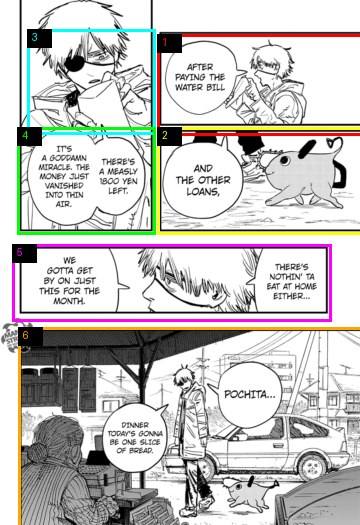
This is the case where manga mode should feel almost invisible. The detector is not trying to understand the story; it is finding plausible panel regions, grouping them into rows, and then applying RTL ordering inside each row. The important behavior is that the reader rarely moves rightward inside a row.
Webtoon: Solo Leveling
Solo Leveling pushed the webtoon path in a different direction. The source gives the chapter as multiple image files, but the reader has to treat those files as one continuous vertical strip. A fixed screen-height scroll would land halfway through faces, speech bubbles and scene transitions.
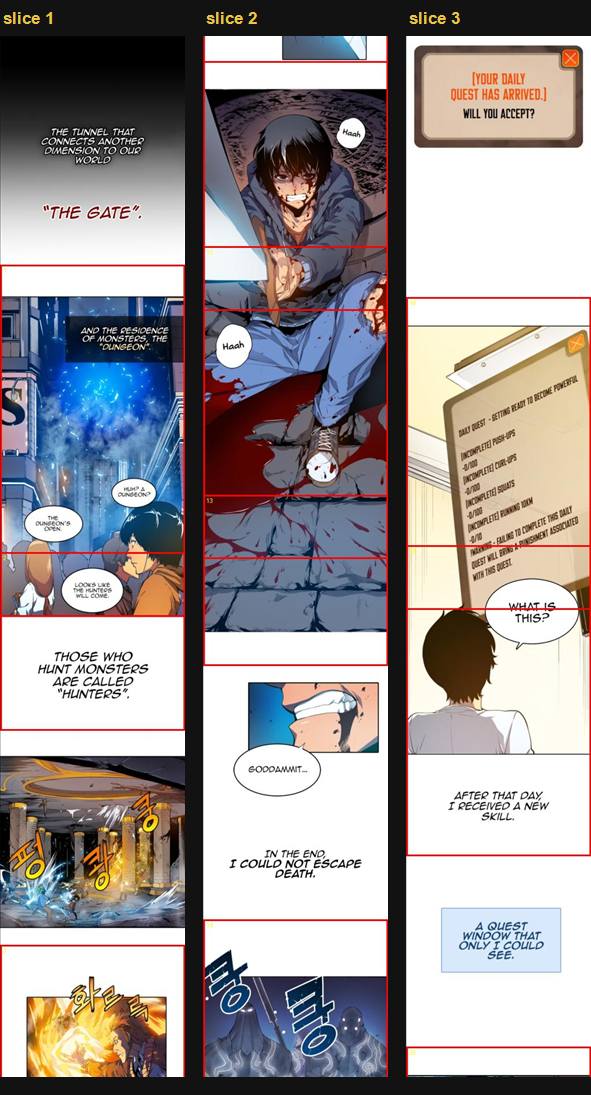
The webtoon method keeps the strip width fixed, then chooses vertical slices from quiet and active row analysis. The regions can overlap. That is deliberate: for a long vertical comic, overlapping slices are usually better than cutting a speech bubble or character beat in half.
Comic Beta: Darth Vader (2020)
Darth Vader (2020) chapter 33 is a good stress test for western comics because the page design is doing a lot: diagonal motion, inset panels, large sound effects, captions and overlapping focal regions. A manga-style “find neat rectangles” pass is not enough.
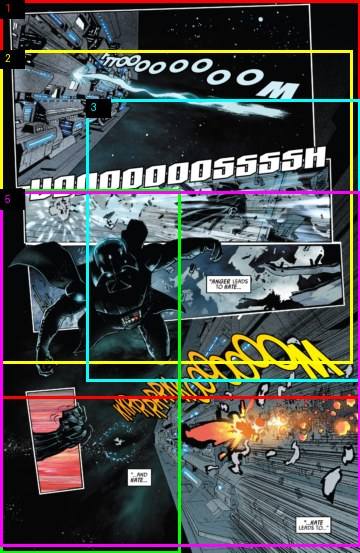
This is why the comic beta became a readable-region selector rather than a pure panel detector. Some boxes overlap, and some are aimed at text or visual focus rather than strict bordered panels. It is still the least polished mode, but the objective is different: choose zoom targets where the reader can actually read the words and follow the page flow on a phone.
What We Landed On
The current prototype uses three modes:
| Mode | Core idea | Current status |
|---|---|---|
| Manga | Multiple rectangular detectors, candidate selection, RTL/LTR ordering, slanted separator pass | Most usable |
| Webtoon | Continuous vertical strip, row-based active/quiet segmentation, overlapping readable slices | Usable, still tuning slice height |
| Comic beta | Hybrid region selector using panels, text-like components and flow fallbacks | Useful but not yet elegant |
The most important design choice was to stop treating panel detection as a single computer-vision answer. It is closer to a reading interface problem. The app needs enough detection to choose a good camera target, enough ordering to preserve story flow, and enough fallback behavior to keep reading when the detector is uncertain.
The next big step is probably better text awareness: not full OCR for transcription, but enough detection to know whether a speech bubble or caption is fully readable inside at least one region. That would give the detector a more reader-centered objective than “did we find the panel border?”
For now, the working rule is simple: a panel selection method is good if the next tap feels obvious, the words are readable, and the reader does not have to think about the detector.